Pentru copiii cu dislexie, părinți și profesori
Pagina de la școală, ușor de citit.
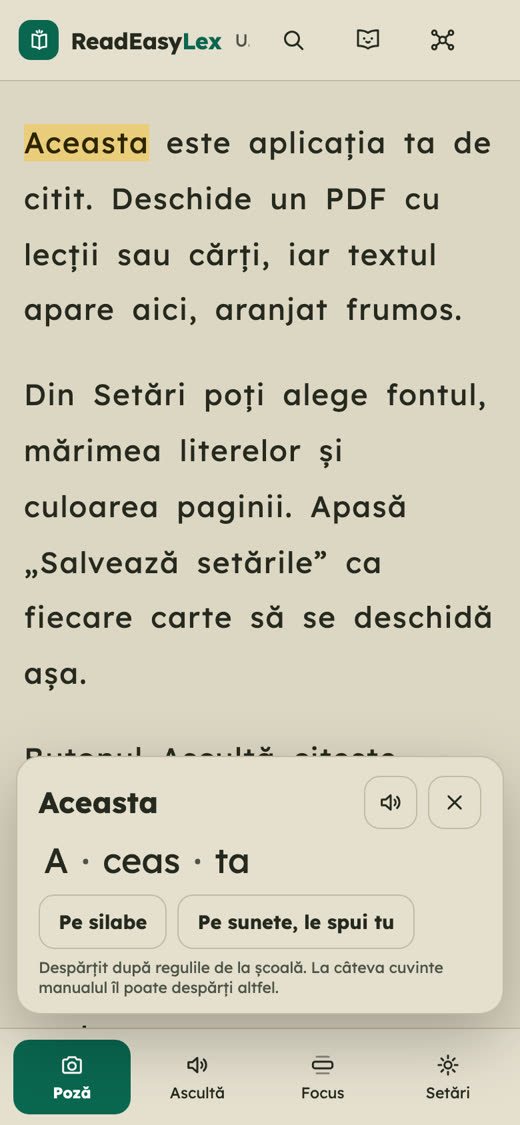
Fotografiezi pagina din manual, iar ReadEasyLex o așază pentru un copil cu dislexie: litere clare, spații mai mari, o voce caldă care citește cu el și silabe la o atingere.
Cum funcționează
Trei pași, același text pe care îl are toată clasa.
- Fotografiezi pagina
Sau deschizi un PDF ori lipești un text. Textul din poză se recunoaște chiar pe telefon.
- Pagina devine ușor de citit
Font pentru dislexie, spații între litere și rânduri, culoarea paginii care obosește cel mai puțin. Le alegi o dată.
- Copilul citește
Ascultă textul, atinge un cuvânt ca să-l vadă pe silabe sau îi citește el lui Lex, mascota care ascultă fără să judece.
Ce găsești în aplicație
Unelte gândite pentru un copil care citește greu, nu un cititor obișnuit cu setări în plus.
Fiecare limbă e citită de o voce nativă, iar cuvântul rostit se colorează. Viteza o alegi tu.
Orice cuvânt, despărțit după regulile de la școală, cu sunetele lui.
Câteva rânduri luminate, restul paginii se estompează. Ochiul nu mai sare.
Litere, silabe și cuvinte în ordinea din abecedar, care se adaptează la ce merge greu.
Șase jocuri scurte care arată ce merită exersat. Nu sunt un test și nu pun un diagnostic.
Zile de citit, viteza de citire și un rezumat pe care îl duci la consilierul școlar.
Cu un PIN, vocea și ajutorul pe cuvânt se opresc, de exemplu la dictare.
Se instalează pe ecranul principal, iar textele deja deschise merg și fără internet.
Pentru cine
Butoane mari, puține cuvinte și nicio notă. Lex se bucură de efort, nu de scor.
Vedeți cât și cum citește copilul, comparat doar cu el însuși, niciodată cu alții.
Aceeași pagină din manual, în forma care îl ajută pe elev, plus modul profesor și fișa de citit.
Confidențialitatea, pe scurt
Aplicația e făcută pentru copii, așa că strânge cât mai puțin. Citește politica de confidențialitate.
- Pozele, PDF-urile și progresul rămân pe dispozitiv. Nu există cont.
- Vocea online și statisticile Google Analytics pornesc doar dacă un adult le acceptă.
- Fără reclame. Numele și vârsta copilului nu pleacă de pe dispozitiv.
Întrebări frecvente
Cât costă?
Acum e gratuit, fără cont și fără reclame.
Pune un diagnostic de dislexie?
Nu. ReadEasyLex ajută la citit și la exersat. Dislexia o stabilește un specialist (psiholog, logoped sau CJRAE / CMBRAE), de obicei după vârsta de 9 ani. Dacă vă îngrijorează cititul copilului, vorbiți cu un specialist.
Pentru ce vârstă e?
Cititorul e pentru orice vârstă. Jocurile cu sunete și litere sunt pentru copiii de 5-9 ani.
Pe ce dispozitive merge?
Pe telefon, tabletă sau calculator, în orice browser actual. O poți adăuga pe ecranul principal ca pe o aplicație.
Merge fără internet?
Textele deja deschise, setările și exercițiile merg și offline, cu vocile telefonului. Pozele noi și vocea online au nevoie de internet.
În ce limbi?
Română, engleză și ucraineană. Vocea se alege singură după limba textului, deci un manual de engleză e citit de o voce engleză.
Cine face ReadEasyLex?
ReadEasyLex e făcut de Hunor-Uwe Szász-Gerőcs, student la Tetr College of Business, din Cluj-Napoca. Sora lui are dislexie, pentru ea a început aplicația. E un proiect independent, construit pas cu pas din ce spun copiii, părinții și specialiștii: feedbackul unui psiholog a schimbat deja felul în care vorbim despre rezultatele jocurilor.
Scrie-ne
O idee, o problemă sau vrei să folosești ReadEasyLex la clasă ori în cabinet? Răspundem la fiecare mesaj.
uweszasz@gmail.comFor children with dyslexia, their parents and teachers
School pages, easy to read.
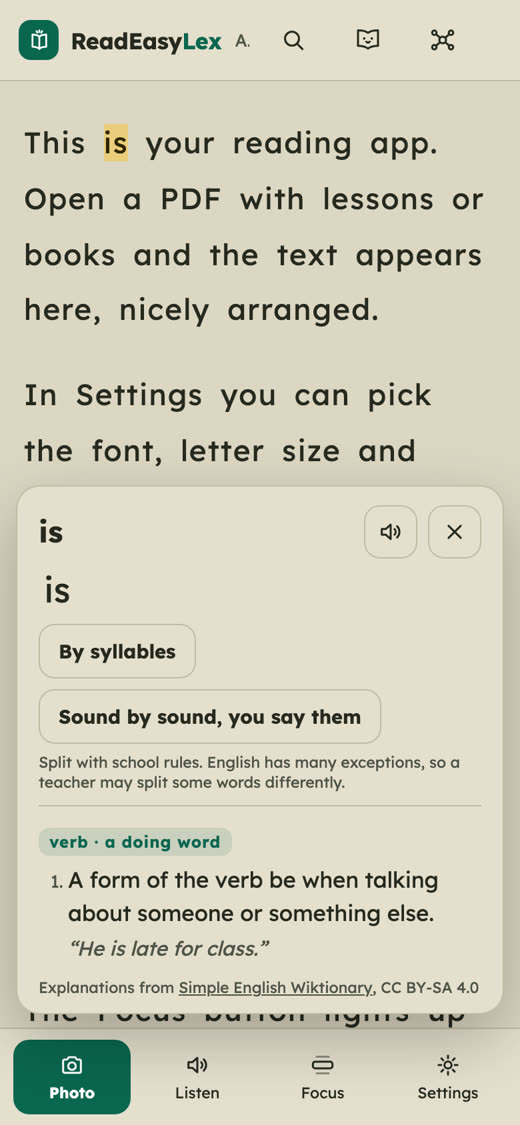
Take a photo of the textbook page and ReadEasyLex lays it out for a child with dyslexia: clear letters, more space, a warm voice that reads along, and syllables at a tap.
How it works
Three steps, and the same text the rest of the class has.
- Take a photo of the page
Or open a PDF or paste some text. The text in the photo is recognised right on the phone.
- The page becomes easy to read
A dyslexia-friendly font, space between letters and lines, the page colour that tires the eyes least. Choose once.
- Your child reads
Listen to the text, tap a word to see its syllables, or read aloud to Lex, the mascot who listens without judging.
What is inside
Tools made for a child who finds reading hard, not an ordinary reader with extra settings.
Each language is read by a native voice, and each spoken word lights up. You choose the speed.
Any word, split the way school teaches it, with its sounds.
A few lines stay bright and the rest of the page fades. The eye stops jumping.
Letters, syllables and words in phonics order, adapting to what is hard.
Six short games that show what is worth practising. They are not a test and give no diagnosis.
Reading days, reading speed and a summary to take to the school.
With a PIN, the voice and word help switch off, for example during dictation.
Install it on the home screen; texts already opened work offline too.
Who it is for
Big buttons, few words and no marks. Lex celebrates effort, not scores.
See how much and how your child reads, compared only with themselves, never with others.
The same textbook page in the form that helps the pupil, plus teacher mode and the reading sheet.
Privacy in short
The app is made for children, so it collects as little as possible. Read the privacy policy.
- Photos, PDFs and progress stay on the device. There is no account.
- The online voice and Google Analytics start only if an adult agrees.
- No ads. The child's name and age never leave the device.
Questions
How much does it cost?
It is free right now, with no account and no ads.
Does it diagnose dyslexia?
No. ReadEasyLex helps with reading and practice. Dyslexia is assessed by a specialist (an educational psychologist or a specialist assessor), usually after about age 9. If you are worried about your child's reading, talk to a specialist.
What age is it for?
The reader is for any age. The sound and letter games are for children aged 5 to 9.
Which devices does it work on?
Phones, tablets and computers, in any current browser. You can add it to the home screen like an app.
Does it work offline?
Texts already opened, settings and exercises work offline with the device's voices. New photos and the online voice need the internet.
Which languages?
English, Romanian and Ukrainian. The voice follows the language of the text, so an English textbook is read by an English voice.
Who makes ReadEasyLex?
ReadEasyLex is made by Hunor-Uwe Szász-Gerőcs, a student at Tetr College of Business, from Cluj-Napoca, Romania. His sister is dyslexic, and the app began as a tool for her. It is an independent project, built step by step from what children, parents and specialists tell us: feedback from a psychologist has already changed how we talk about the game results.
Write to us
An idea, a problem, or want to use ReadEasyLex in class or in therapy? We answer every message.
uweszasz@gmail.comДля дітей з дислексією, батьків і вчителів
Шкільна сторінка, яку легко читати.
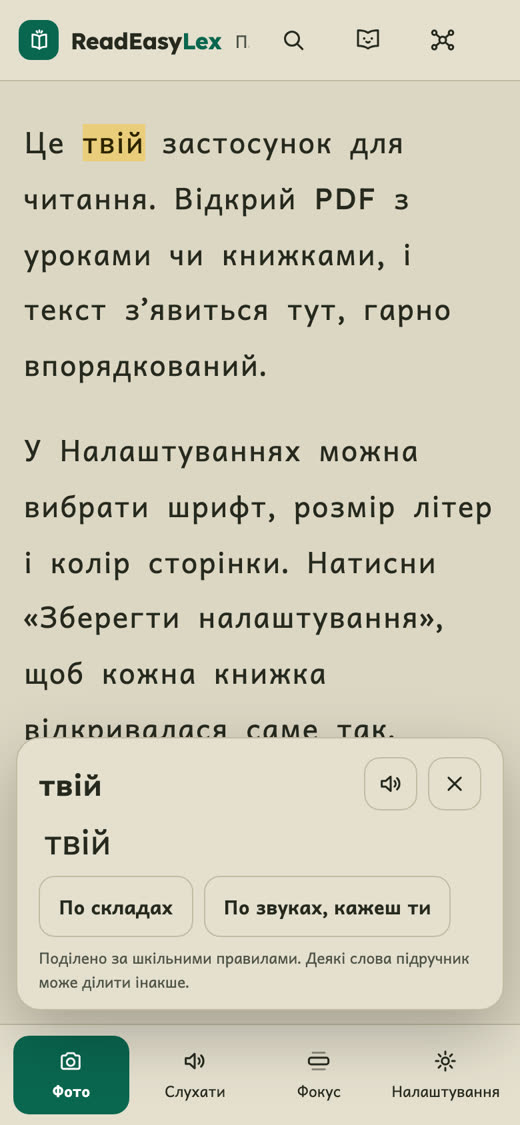
Сфотографуйте сторінку підручника, і ReadEasyLex підлаштує її для дитини з дислексією: чіткі літери, більше простору, теплий голос, що читає разом, і склади одним дотиком.
Як це працює
Три кроки, і той самий текст, що й у всього класу.
- Сфотографуйте сторінку
Або відкрийте PDF чи вставте текст. Текст на фото розпізнається просто на телефоні.
- Сторінку легко читати
Шрифт для дислексії, відстані між літерами й рядками, колір сторінки, що найменше втомлює очі. Обираєте один раз.
- Дитина читає
Слухає текст, торкається слова, щоб побачити склади, або читає вголос Лексу, талісману, який слухає без оцінок.
Що всередині
Інструменти для дитини, якій важко читати, а не звичайна читалка з додатковими налаштуваннями.
Кожну мову читає голос носія, а вимовлене слово підсвічується. Швидкість обираєте ви.
Будь-яке слово, поділене так, як навчають у школі, з його звуками.
Кілька рядків залишаються яскравими, решта сторінки тьмяніє. Око більше не стрибає.
Літери, склади й слова за порядком букваря, з урахуванням того, що дається важко.
Шість коротких ігор, які показують, що варто потренувати. Це не тест і не діагноз.
Дні читання, швидкість читання і підсумок, який можна віднести до школи.
З PIN-кодом голос і допомога зі словами вимикаються, наприклад під час диктанту.
Встановлюється на головний екран, а вже відкриті тексти працюють і без інтернету.
Для кого
Великі кнопки, мало слів і жодних оцінок. Лекс радіє зусиллям, а не балам.
Бачите, скільки і як читає дитина, у порівнянні лише з собою, ніколи з іншими.
Та сама сторінка підручника у формі, що допомагає учневі, плюс режим учителя й довідка про читання.
Конфіденційність коротко
Застосунок створено для дітей, тому він збирає якомога менше. Прочитати політику конфіденційності.
- Фото, PDF і прогрес залишаються на пристрої. Облікового запису немає.
- Онлайн-голос і Google Analytics вмикаються лише за згодою дорослого.
- Без реклами. Ім’я та вік дитини не залишають пристрій.
Запитання
Скільки це коштує?
Зараз безкоштовно, без облікового запису і без реклами.
Чи ставить застосунок діагноз дислексії?
Ні. ReadEasyLex допомагає читати і тренуватися. Дислексію визначає фахівець (психолог, логопед або ІРЦ), зазвичай після 9 років. Якщо вас турбує читання дитини, зверніться до фахівця.
Для якого віку?
Читалка для будь-якого віку. Ігри зі звуками й літерами для дітей 5-9 років.
На яких пристроях працює?
На телефоні, планшеті чи комп’ютері, у будь-якому сучасному браузері. Його можна додати на головний екран як застосунок.
Чи працює без інтернету?
Уже відкриті тексти, налаштування і вправи працюють офлайн з голосами пристрою. Нові фото й онлайн-голос потребують інтернету.
Якими мовами?
Українською, румунською та англійською. Голос обирається за мовою тексту, тож англійський підручник читає англійський голос.
Хто створює ReadEasyLex?
ReadEasyLex створює Hunor-Uwe Szász-Gerőcs, студент Tetr College of Business із Клуж-Напоки (Румунія). Його сестра має дислексію, і застосунок почався як інструмент для неї. Це незалежний проєкт, який росте крок за кроком із того, що кажуть діти, батьки та фахівці: відгук психолога вже змінив те, як ми говоримо про результати ігор.
Напишіть нам
Маєте ідею, проблему або хочете використовувати ReadEasyLex у класі чи в кабінеті? Ми відповідаємо на кожен лист.
uweszasz@gmail.com